

How to Upgrade Players in FC 26: A Detailed Evolutions Guide
Evolutions are one of the best features in EA FC games. But if you’re new to FC 26, they can be a little tricky. To put it simply, Evolutions allow you to upgrade specific players.…

Evolutions are one of the best features in EA FC games. But if you’re new to FC 26, they can be a little tricky. To put it simply, Evolutions allow you to upgrade specific players. These upgrades can vary depending on the Evolution. However, there is more to learn if you want to truly master Evolutions, which we will cover in detail.
What Are Evolutions in EA FC 26?
Evolutions are in-game objectives that help you upgrade players in FUT. With Evolutions, you can add extra stats, PlayStyles, and other upgrades to your favorite players.
Let’s take the Golden Gloves Evolution as an example, which is the best choice if you want your goalkeeper to stay calm under pressure and turn shots into big saves.
Select a GK that is eligible for this Evolution, and you can add strong upgrades like up to +2 OVR, +2 to diving, handling, kicking, and more, along with PlayStyles like Far Reach and Footwork. You can also add new roles such as Ball-Playing Keeper++ and Sweeper Keeper++.
In FC 26, Evolutions are better than before. We now have Goalkeeper Evolutions and Repeatable Evolutions. Moreover, you can also stack the visuals of a player card without overwriting its previous appearance.
How Evolutions Work in EA FC 26

FC 26 releases new Evolutions for Ultimate Team from time to time. Depending on the Evolution, it can be either free or paid. That said, every Evolution has player requirements and total upgrades.
Under player requirements, you will find all the conditions a player must meet to be used in that Evolution. For example, a maximum OVR limit, a specific role (primary or alternate, both work), a certain number of PlayStyles, and more.
Under total upgrades, you will find all the upgrades your player will receive after completing an Evolution. Keep in mind that most upgrades are capped.
Let’s go back to the Golden Gloves Evolution again. Your GK will get +2 OVR, but the OVR cannot go beyond 86. So, if the GK you selected has 85 OVR, they will only reach 86 and not 87, because the maximum OVR for the Golden Gloves Evolution is capped at 86.
This mechanic also applies to other stat upgrades, PlayStyles, and even SM and WF ratings.
Types of Evolutions in EA FC 26
While the game does not officially divide Evolutions into different types, for clarity, you can categorize them into four main types.
Stat Evolutions: As the name suggests, these Evolutions provide stat upgrades to your selected player. These upgrades include overall rating, acceleration, pace, strength, and more.
PlayStyle Evolutions: These Evolutions only provide PlayStyle upgrades to your players. Take the Pinged Pass+ Evolution as an example. The only upgrade you get from it is the Pinged Pass+ PlayStyle.
Position Evolutions: These Evolutions only upgrade player positions. For example, the ST to CAM Evolution adds CAM as an alternate position to your selected Striker.
Visual Upgrade Evolutions: Some Evolutions change the visual appearance of your player card along with related upgrades. However, a few special Evolutions, such as TOTS Retro, only change the card design and do not provide any gameplay upgrades.
Most popular Evolutions include a mix of multiple upgrades. They improve stats, add new PlayStyles, roles, and even SM and WF ratings.
Finally, Evolutions can also be divided into two types: repeatable and non-repeatable.
In FC 26, some Evolutions are repeatable and can be completed two or three times. On the other hand, some Evolutions are single-use and are non-repeatable.
Best Players to Use in EA FC 26 Evolutions
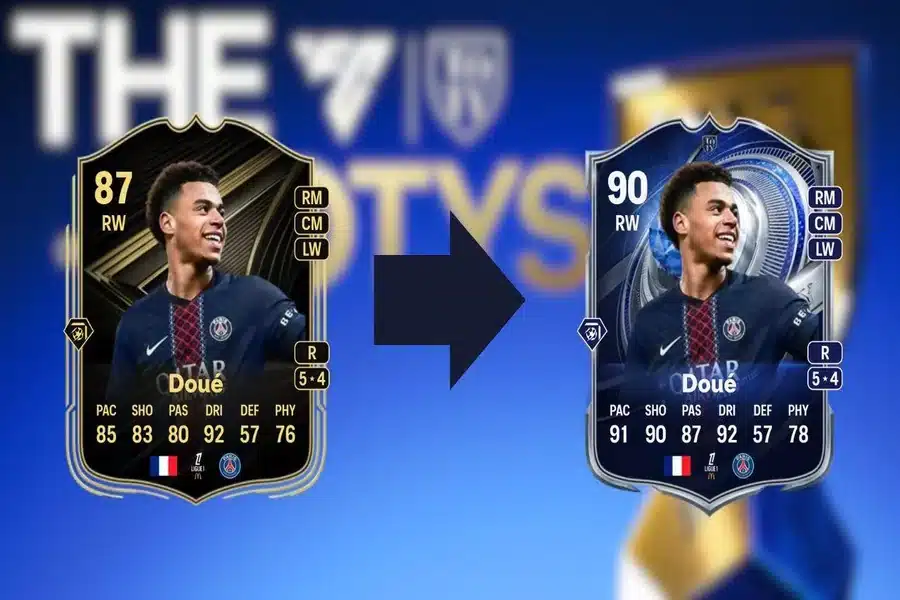
Now comes the question: how can you find the best player to use for an Evolution? For this, you can use a handy feature called Evo Lab on FUTGG.
Go to FUTGG, click on the menu to expand it, and select Evo Lab under Tools. Here, you can select a player you are thinking of evolving and choose the appropriate Evolution. Simply click on Apply, and you will see how your player will look after completing the Evolution.
Try this with multiple players and select the one that gets the highest upgrades. If you are still having trouble deciding, go back to the menu and select Evolutions. Pick the Evolution you want to complete and click on it. You will then find the Trending Evolved Players list. These are players that the community is currently using for that Evolution.
You can also do the same on FUTBIN. The tool is called Evolution Builder on this platform.
Read More: Hunger Games New Movie Brings A Dark Origin Story
Are Evolutions Worth It in EA FC 26?
Whether an Evolution is worth it or not depends on your personal preference. Most free Evolutions are worth trying, but there are also a few free ones that are not worth your time.
When it comes to paid Evolutions, you need to be a bit careful. To start a paid Evolution, you must spend either FC Points or Coins. This is where tools like Evo Lab and Evolution Builder become useful.
Before starting an Evolution, you can check the final result using these tools. This makes it easier to decide whether that Evolution is worth it for you.
To see what the community thinks about an Evolution, go to FUTBIN and check whether the votes are mostly positive or negative.
By following these steps, you can easily decide whether an Evolution is worth it or not.
Frequently Asked Questions
Are FC 26 Evolution upgrades permanent?
Yes, upgrades received through Evolutions are permanent.
Do FC 26 Evolutions expire?
Yes, every Evolution has a specific time, usually 28 days. You must finish all upgrades before the time limit expires to receive all upgrades.
Can I apply two or more Evolutions to the same player?
Yes, as long as the player meets the requirements, you can apply multiple Evolutions to the same player. Keep in mind that you cannot have more than one active Evolution on a player, but you can complete them one after the other.
Can I cancel an Evolution in EA FC 26?
No, you cannot cancel or reset an Evolution once started in FC 26. Instead, you can quick sell the player and start fresh again.